Managing tickets
A ticket in AllMy Support carries a status, an assignee, a priority, tags, and any custom fields your workspace has defined. The right panel on a ticket is where you set all of them.
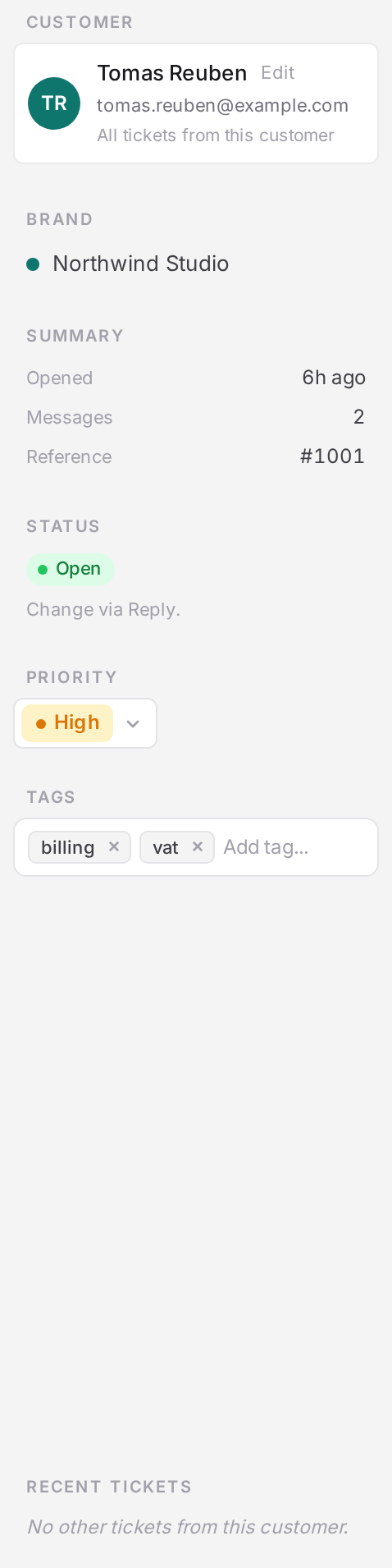
Statuses
There are four statuses. New and unassigned aren't statuses, they're inbox filters: new means an open ticket you haven't read yet, and unassigned means one that has no assignee.
- Open. Needs work.
- Pending. Waiting on the customer.
- Hold. Waiting on a chase date you set.
- Closed. Resolved.
Holds and chase dates
Setting a ticket to Hold requires a chase date in the future. AllMy Support has no automatic hold timer: the ticket sits in the collapsed Holding section of your inbox until that date arrives, then moves itself into Review hold so you see it again. Moving a ticket off hold clears the chase date. Shortcut chips give you +1 day, +3 days, +1 week, or +2 weeks so you rarely have to pick a date by hand.
- Open the ticket.
- Set status to Hold.
- Pick a chase date, or a shortcut chip.
- It returns to Review hold in your inbox on that date.
What a customer sees
If the brand runs a customer portal, the status you set is what the customer reads, in their words rather than yours. Setting a ticket to Pending is telling them you are waiting on them.
| You set | The customer reads |
|---|---|
| Open | Open |
| Pending | Awaiting your reply |
| Hold | In progress |
| Closed | Closed |
Assignment
Assign a ticket to any agent on the workspace. Unassigned tickets sit in Up for grabs until someone claims them, and the first agent to reply becomes the assignee automatically, even if nobody assigned it first.
Priorities
Four levels: low, normal, high, urgent. Every new ticket starts at normal. Priority is a manual signal you set, separate from whether a ticket is actually overdue against its SLA.
Tags
Tags are free-form and shared across the whole workspace, not scoped to one brand. Start typing and autocomplete suggests existing tags; type something new and it's created on the spot. Filter by tag across every brand, or narrow to one.
Custom fields
Custom fields come in five types: text, number, date, dropdown, and checkbox. An admin defines each field as company-wide or specific to one brand; any agent can set its value on a ticket they can see.
Internal notes
Post an internal note when you need to leave context for teammates without emailing the customer. Notes are never sent out, and posting one doesn't touch the ticket's status, assignee, or SLA clock.
Tip: Reserve Hold for tickets you're deliberately setting aside until a specific date. If you're just waiting on the customer to answer, Pending is the right status; a customer reply reopens it automatically.