April 2026
Tax season's over. Five things to fix in your books while it's all fresh.
Whether your deadline was March 15 or April 15, the folder is closed. The missing invoice you couldn't track down, the categories that were wrong, the contractor whose W-9 you scrambled for the morning of: all of it is about to get forgotten by next Tuesday.
This is where most freelancers and small business owners check out. The folder closes, the receipts go back in the drawer, and you don't think about the books again until next March. That's the bad move. What working accountants tell their clients to do, instead, is fix five specific things while every gap is still in your head.
Reconcile every account, every month from now on
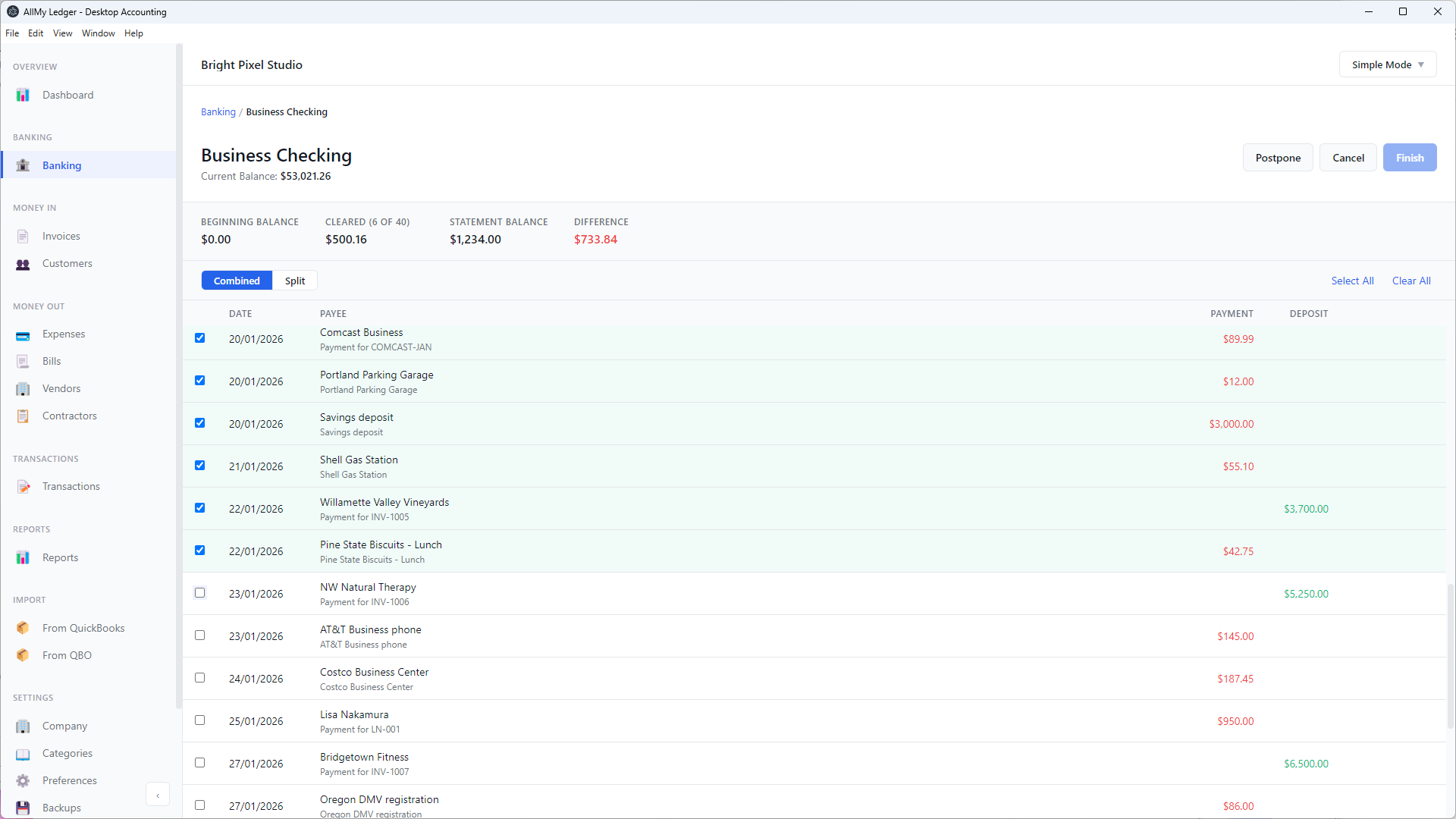
Reconciliation is the single thing that separates books you can trust from books you have to second-guess. Every transaction in your accounting software needs to match a transaction on your bank or credit card statement. When they match, your numbers are real. When they don't, every report you run is built on quicksand.
The reason this gets ugly is time. An error you don't catch within a month is buried under three more months of activity. By December, untangling it can take a full afternoon. By next March, it's a CPA bill.
The fix is a habit. Pick a recurring day, like the second Tuesday of every month, and reconcile last month before you do anything else. Download an OFX or QFX file from your bank's website. Don't use a third-party aggregator that logs into your bank on your behalf. Match every transaction. Investigate every difference.
If your reconciliation feels too slow, that's usually a sign you're letting it pile up. Two months is a slog. Twelve is a project. (More on the actual mechanics in the reconciliation docs.)
Run an AR aging report and chase what's actually past due
You sent invoices in February. You filed your taxes a few weeks later. Some of those invoices never got paid. You probably know which ones. You probably haven't called.
The fix is unglamorous: pull an aging report sorted into buckets, 30 days, 60, 90+. Anything over 60 isn't a follow-up email problem. It's a phone call. Anything over 90 is a credit decision: do you keep working with this client, or do you write the balance off and stop?
While you're in there, take ten minutes to clean up your customer list. Inactive customers, duplicates, the freelancer you hired once in 2024 and accidentally created as a customer instead of a vendor: sort it out now while the names still mean something to you.
In AllMy Ledger, the Customer Statement (Activity) report and the new Customer List give you both the history and the directory. The principle holds whatever you use. (See the reports overview.)
Post your CPA's adjusting entries back into your own books
Your CPA made adjustments on your tax return. Maybe they recorded depreciation. Maybe they accrued an unpaid bill. Maybe they reclassified something you'd put in the wrong account. The return is filed. The adjustments are in their software.
They're probably not in yours.
This is how a year of bookkeeping drifts away from what was actually filed. Every year you don't post the adjustments back, the gap grows. Three years of that, and your books and your tax history don't agree on anything.
Email your CPA and ask for a journal entry list of the year-end adjustments. It's a one-line request. They'll either send it or schedule a fifteen-minute call to walk through it. Then post the entries to your own ledger, dated December 31 of the year you just filed. Future you, filing next year or selling the business or applying for a loan, will thank present you.
Fix the miscategorized stuff while it's still fresh
You found things during taxes. The Adobe charge that got tagged as Office Supplies. The personal Amazon order that landed on your business card. The Uber rides for a client lunch that ended up in Travel instead of Meals. You probably told yourself you'd come back to it. Come back to it now.
Two specific moves are worth doing this week. First: separate any personal-card-charges-on-the-business-account from real expenses. Either reclassify them as owner draws, or, if you really did pay them out of business funds, reimburse the business properly.
Second: assign a Schedule C tax line to every income and expense account in your chart of accounts. The Schedule C report only works if every account knows where it goes. Doing this once, slowly, in April, is the difference between a January tax-prep panic and pressing a button.
Verify 1099 records, and start tracking next year's now
If you paid any contractor $600 or more last year, you sent them a 1099-NEC in January. Or you were supposed to. Pull the list of 1099s you actually filed. Cross-check against your bookkeeping: every contractor flagged as 1099, with full-year payment totals. Numbers should match. If they don't, you have homework before the IRS notices.
Then for the rest of this year: every new contractor gets a W-9 before you send them their first payment. Set the rule and don't break it. The January scramble of chasing W-9s from people who already cashed your check is purely self-inflicted.
If your software supports filtering vendors by 1099 status, use it next January. If not, write down the rule somewhere you'll see it: no W-9, no payment. That's the whole policy. (More on the contractor and 1099 workflow.)
The point
Every one of these is bookkeeping hygiene, not tax strategy. None of them needs a CPA. None of them takes more than half a day if you do them now, while the gaps are still fresh.
What they do need is software that doesn't fight you. I'm the developer behind AllMy Ledger. It's what I use for my own books: a desktop app, one-time purchase, that handles all five of the items above. There's a free 7-day trial if you want to see how it feels.